LLM Video Screen-Scraping#
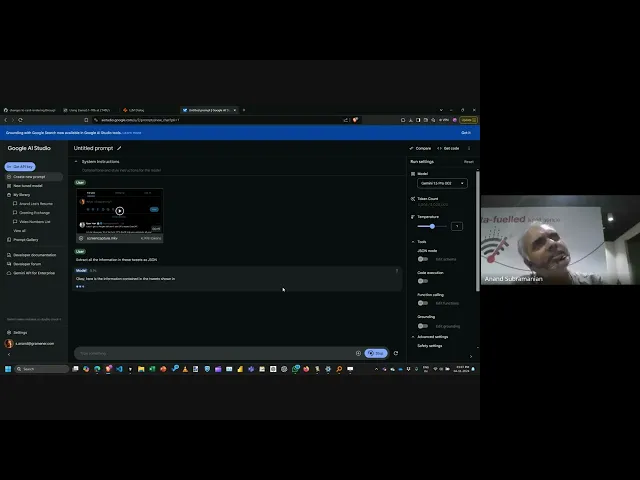
Video screen-scraping with LLMs is a powerful technique for extracting structured data from screen recordings. This approach works with any visible screen content and bypasses traditional web scraping limitations like authentication or anti-scraping measures.
Key benefits:
- No setup cost or authentication handling
- Works with any visible screen content
- Full control over data exposure
- Extremely cost-effective (< $0.001 per short video)
- Bypasses anti-scraping measures
- Handles varying formats and layouts
Quick Start Example#
Here’s a basic workflow using Google’s AI Studio and Gemini:
- Record the Screen
- Use QuickTime (Mac) or Windows Game Bar (Windows), Screen2Gif, or any tool of your choice
- Select specific screen area containing target data
- Record scrolling/clicking through content
- Keep recordings short (30-60 seconds)
- Process with Gemini
- Upload to Google AI Studio
- Select Gemini 1.5 Flash (cost-effective)
- Prompt for structured output (JSON/CSV)
Example prompt for extracting tabular data:
Turn this video into a JSON array where each item has:
{
  "date": "yyyy-mm-dd",
  "amount": float
}
Cost Calculation#
Gemini 1.5 Flash pricing (as of January 2025):
- $0.075 per million tokens
- Cost per frame ~ 250 tokens
- Cost for 24 hours of video at 1 frame per second ~ $1.62!
Best Practices#
- Recording Quality
- Frame only relevant content
- Pause briefly on important data
- Maintain consistent scroll speed
- Use high contrast display settings
- Data Validation
- Always verify critical data manually
- Use spot-checking for large datasets
- Consider running multiple passes
- Log and review any anomalies
- Error Handling
- Request data in simple formats (CSV/JSON)
- Include validation in prompts
- Split long videos into segments
- Handle missing/partial data gracefully
Use Cases#
- Data Extraction
- Email content aggregation
- Dashboard metrics collection
- Protected web content
- Legacy system data
- Data Journalism
- Public records analysis
- Time-series data collection
- Interactive visualization data
- Government website scraping
- Business Intelligence
- Competitor pricing analysis
- Market research data
- Internal system migration
- Legacy report conversion
Tools:
- Google AI Studio: Process videos with Gemini
- QuickTime Player: Screen recording (Mac)
- Screen2Gif: Screen recording (Windows)
- OBS Studio: Advanced screen recording (cross-platform)
References: