Local LLM Tools — Practical Notes#
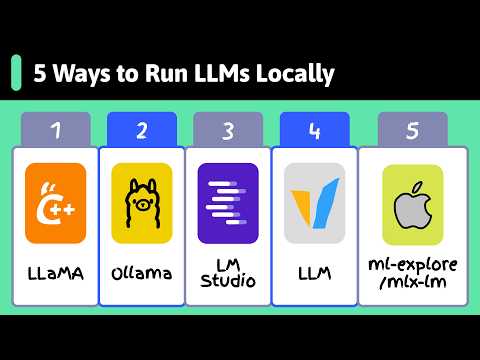
One-page summary of all tools#
| Tool | Best use | Interface | Best user |
|---|---|---|---|
| LM Studio | GUI-based local LLM usage, model search, chat, local API, document chat | GUI + CLI + API | Beginner, AI user, developer testing |
| Ollama | Fast local model running, CLI, local REST API, coding-tool integration | CLI + API + Docker | Developer prototyping |
| llama.cpp | Deep control over GGUF models, quantization, CPU/GPU tuning, offline inference | CLI + server + C/C++ backend | Systems-minded developer |
| vLLM | Production LLM serving, batching, high-throughput GPU inference | Python + server + Docker | Backend/ML engineer |
| MLX / mlx-lm | Apple Silicon-native inference/fine-tuning | Python + CLI + Apple stack | Mac / Apple developer |
Simple choice:
Beginner GUI / non-coder demo       → LM Studio
Fast developer prototype            → Ollama
Maximum local control / GGUF        → llama.cpp
Production GPU serving              → vLLM
Apple M-chip native inference       → MLX / mlx-lm
The most important legal idea: tool license and model license are separate. A tool may be MIT or Apache-2.0, but the model you download may have a different license. Hugging Face says licenses are specified in model cards and users should respect each model/data license.
2. Local LLM basics every student must understand first#
2.1 What actually runs locally?#
When you “run an LLM locally,” your computer loads these things:
Model weights       → the learned numbers of the model
Tokenizer           → converts text ↔ tokens
Runtime/backend     → software that performs inference
Prompt template     → formats system/user/assistant messages
KV cache            → memory used while generating long responses
API server          → optional local endpoint for apps
A local LLM tool usually does four jobs:
Download model → Load model into RAM/VRAM → Generate tokens → Serve response through CLI/API/GUI2.2 Model file formats#
Common formats:
| Format | Used by | Meaning |
|---|---|---|
| GGUF | llama.cpp, Ollama, LM Studio | Quantized/local inference-friendly model format |
| safetensors | Hugging Face, vLLM, Transformers | Common model weight format for PyTorch/HF models |
| MLX format | MLX / mlx-lm / LM Studio on Apple Silicon | Apple Silicon-optimized model format |
GGUF is a binary format designed for quick loading/saving and efficient inference with GGML-based executors like llama.cpp; Hugging Face also supports browsing, converting, and viewing GGUF metadata.
2.3 Quantization#
Quantization means storing model weights in lower precision so they use less memory.
Example:
FP16 model: higher quality, larger file, more RAM/VRAM
Q8 model:  good quality, smaller
Q5/Q4:     much smaller, usually good enough for local use
Q3/Q2:     very small, quality may drop
Practical beginner rule:
Q4_K_M → good default for small machines
Q5_K_M → better quality if you have more memory
Q8_0   → close to original, but larger
FP16   → best quality, expensive memory use
Quantization is one reason a 7B or 8B model can run on a normal laptop.
2.4 Context length and KV cache#
Context length means how many tokens the model can “see” at once.
Small context  → less memory, faster
Large context  → more document/code can fit, but slower and heavier
KV cache grows during inference. This is why a model may load successfully but later become slow or crash when you use a very long prompt.
2.5 RAM, VRAM, CPU, GPU#
Rough practical sizing:
8 GB RAM      → small 1B–3B models, sometimes 7B Q4 slowly
16 GB RAM     → 3B–8B Q4 practical
32 GB RAM     → 7B–14B comfortable, some 20B Q4
8 GB VRAM     → 7B/8B Q4 usually realistic
12–16 GB VRAM → 7B–14B better
24 GB VRAM    → 14B–32B class experiments
For local LLMs, memory size often matters more than raw GPU speed. Running out of VRAM usually causes huge slowdown because work spills to CPU/system RAM.
2.6 Tokens, streaming, and latency#
LLMs generate one token at a time.
Important metrics:
TTFT              → time to first token
tokens/sec        → generation speed
prompt tokens/sec → speed of reading the prompt
output tokens/sec → speed of writing answer
Streaming is useful because the user sees output while it is being generated. Ollama’s REST API streams by default, while non-streaming is easier for short responses and structured outputs.
2.7 OpenAI-compatible API#
Many tools expose an OpenAI-like API:
/v1/chat/completions
/v1/completions
/v1/embeddings
/v1/models
This is important because the same app can often switch between:
OpenAI API
Ollama local API
LM Studio local API
llama.cpp server
vLLM production server
Only the base_url, api_key, and model usually change.
3. Installation, files, cache, and cleanup: common ideas#
3.1 Where files usually go#
| Tool | Runtime installed where | Model files usually stored where |
|---|---|---|
| Ollama | system app/service + ollama binary | macOS ~/.ollama; Linux often /usr/share/ollama; Windows user .ollama folder |
| llama.cpp | package manager binary or source build folder | anywhere you keep .gguf, or HF cache if using -hf |
| LM Studio | desktop app + lms CLI | ~/.lmstudio/models/publisher/model/model.gguf |
| vLLM | Python environment or Docker image | Hugging Face cache |
| MLX / mlx-lm | Python environment | Hugging Face cache or local converted MLX folder |
Hugging Face’s default cache is under ~/.cache/huggingface, with model repositories usually under ~/.cache/huggingface/hub; HF_HOME and HF_HUB_CACHE can change those locations.
Useful cache commands:
# Check sizes
du -sh ~/.cache/huggingface 2>/dev/null
du -sh ~/.ollama 2>/dev/null
du -sh ~/.lmstudio 2>/dev/null

# Move Hugging Face cache for future shells
export HF_HOME="/data/huggingface"
export HF_HUB_CACHE="/data/huggingface/hub"

# Move Ollama model storage
export OLLAMA_MODELS="/data/ollama-models"
Add those exports to ~/.bashrc or ~/.zshrc for permanent use.
4. Licensing and commercial use#
4.1 Tool license summary#
| Tool | License / terms | Can use in commercial work? |
|---|---|---|
| Ollama | MIT license | Generally yes, but check model license |
| llama.cpp | MIT license | Generally yes, but check model license |
| vLLM | Apache-2.0 | Generally yes, with Apache notice/license obligations |
| MLX / mlx-lm | MIT license | Generally yes, but check model license |
| LM Studio | Proprietary app terms, free for home/work | Internal business use allowed; redistribution/SaaS/service-bureau use restricted |
Ollama and llama.cpp use MIT licenses, whose text permits use, copying, modification, distribution, sublicensing, and selling copies under the license conditions. vLLM’s GitHub repository lists Apache-2.0. MLX and mlx-lm are MIT-licensed.
LM Studio says it is free to use at home and at work, but its app terms grant use for personal/internal business purposes and restrict things like redistribution, selling, service-bureau use, SaaS use, and reverse engineering.
4.2 Model license is the real production risk#
Before making money with a local LLM product, check:
1. Model card license
2. Commercial use permission
3. Attribution requirements
4. Redistribution rules
5. Acceptable-use policy
6. Whether fine-tuned/derived models are allowed
7. Whether serving the model to customers is allowed
Example: Mistral announced Mistral 7B under Apache-2.0 and said it can be used without restrictions. But not every model is like that. Some “open weight” models are not OSI-style open source and may include usage or scale restrictions.
Practical rule:
Tool license permissive ≠ model license permissive.
Always check the model card before production.
5. Shared developer workflow used by all tools#
Create one test project:
mkdir local-llm-lab
cd local-llm-lab

python -m venv .venv
source .venv/bin/activate

pip install openai requests python-dotenv
touch app.py .env
OpenAI-compatible Python client pattern:
from openai import OpenAI

client = OpenAI(
    base_url="http://localhost:11434/v1",  # change per tool
    api_key="local-key"                    # often ignored locally
)

response = client.chat.completions.create(
    model="llama3.2:3b",
    messages=[
        {"role": "system", "content": "You are a clear programming tutor."},
        {"role": "user", "content": "Explain Git branches in simple words."}
    ],
    temperature=0.2,
)

print(response.choices[0].message.content)
Common base URLs:
Ollama       → http://localhost:11434/v1
LM Studio    → http://localhost:1234/v1
llama.cpp    → http://localhost:8080/v1
vLLM         → http://localhost:8000/v1
MLX server   → often http://localhost:8080/v1, depending on server command
Important Q&A#
Q: Can I run a 70B model on my 8GB laptop? A: Realistically, no. An 8GB laptop can run up to ~7B or 8B parameter models if they are heavily quantized (e.g., Q4), leaving some memory for the OS and context window. A 70B model requires much more RAM/VRAM (usually 32GB+).
Q: If I use llama.cpp, is my data sent to the cloud?
A: No. llama.cpp and similar tools run entirely locally. Your data and prompts never leave your machine unless you explicitly connect it to an external API.
Q: Are open weights the same as open source? A: Not always. True open-source licenses (like MIT or Apache 2.0) allow unrestricted use. Many “open weights” models have custom licenses that restrict commercial use or limit usage based on monthly active users.
Video Resources#
Watch these videos to learn how to run open-source large language models locally using Ollama and Llamafile:
Final revision checklist#
[ ] I understand the difference between model weights and the inference engine.
[ ] I know what GGUF and safetensors formats are.
[ ] I understand how quantization helps models run on smaller hardware.
[ ] I know that tool licenses and model licenses are separate.
[ ] I can use the OpenAI compatible API with local base URLs.