Context Engineering#
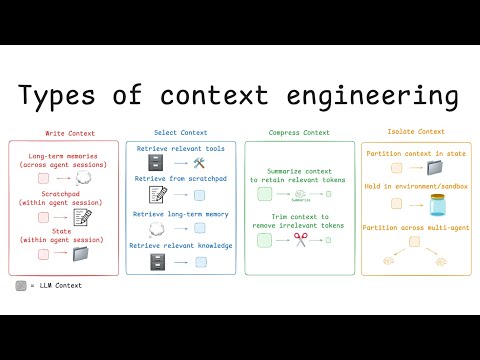
Context engineering is the discipline of designing what goes in the context window — the system prompt, background documents, instructions, tools, and conversation history — to make an LLM behave consistently and correctly across all inputs.
Prompt Engineering vs Context Engineering
- Prompt Engineering: How to phrase one query to get a good answer
- Context Engineering: How to architect the entire context so the model behaves reliably on every query
The Context Window Budget#
Every LLM has a finite context window (measured in tokens). You decide how to spend it:
┌─────────────────────────────────────────────────────────────┐
│ Context Window (e.g. 200,000 tokens for Claude)             │
│                                                             │
│  System Prompt         ████████████  ~2,000 tokens          │
│  Tools/Schema          ████████      ~1,500 tokens          │
│  Retrieved Docs (RAG)  ████████████████████  ~50,000        │
│  Conversation History  ████████████  ~20,000 tokens         │
│  Current User Message  ██  ~500 tokens                      │
│  ─────────────────────────────────────────────────────────  │
│  Reserve for Output    ████  ~4,096 tokens                  │
└─────────────────────────────────────────────────────────────┘
Context engineering is about budgeting well — putting the right information in the right position.
System Prompt Design#
The system prompt is the most important thing you control. It runs on every request.
Anatomy of a Great System Prompt#
import anthropic

SYSTEM_PROMPT = """# Role
You are TDS Assistant, an expert teaching assistant for the IIT Madras "Tools in Data Science" course.

# Primary Responsibilities
- Answer student questions about course topics: Python, FastAPI, Docker, LLMs, RAG, agents
- Provide working code examples when asked
- Point students to relevant week/lab content when appropriate

# Tone and Style
- Be precise and technical — students are intermediate-to-advanced programmers
- Use concrete examples over abstract explanations
- If you don't know something specific to the course, say so clearly

# Constraints
- Only answer questions relevant to the course topics listed above
- Do not write complete assignments for students — guide them to the answer
- Always test code mentally before sharing it

# Output Format
- For code: use fenced code blocks with the language specified
- For explanations: use headers to organize long answers
- For step-by-step guides: use numbered lists
"""

client = anthropic.Anthropic()

def ask(question: str, history: list = None) -> str:
    messages = history or []
    messages.append({"role": "user", "content": question})

    response = client.messages.create(
        model="claude-sonnet-4-6",
        max_tokens=2048,
        system=SYSTEM_PROMPT,
        messages=messages,
    )
    return response.content[0].text
System Prompt Anti-Patterns#
❌ Too vague:
"Be helpful and answer questions."

❌ Contradictory:
"Be concise. Always provide thorough, detailed explanations."

❌ No format guidance:
(model returns inconsistent formats for the same query type)

❌ Missing constraints:
(model happily writes student assignments for them)

✅ Good system prompt structure:
- Role / Who you are
- Responsibilities / What you do
- Tone / How you communicate
- Constraints / What you won't do
- Output Format / How to structure responsesAGENTS.md#
AGENTS.md is a convention for documenting how AI coding agents should interact with a codebase. Tools like Claude Code, Cursor, and GitHub Copilot read this file to understand project-specific context.
# TDS Course API — Agent Context

## Project Overview
FastAPI service for the TDS course platform. Handles student auth, lab submissions, and grade tracking.

## Tech Stack
- **Runtime**: Python 3.12, UV package manager
- **Framework**: FastAPI 0.115+
- **Database**: PostgreSQL 16 via asyncpg
- **Cache**: Redis 7
- **Tests**: pytest + httpx AsyncClient

## Directory Structure
```
src/
├── api/          # FastAPI routes (one file per resource)
├── models/       # Pydantic request/response models
├── db/           # Database layer (asyncpg, no ORM)
├── services/     # Business logic
└── tests/        # mirrors src/ structure
```

## Coding Conventions
- All DB functions are async; use `await` everywhere
- Use `structlog` for logging, not `print` or stdlib logging
- Pydantic models live in `models/`, not inline in routes
- Every route MUST have a corresponding test in `tests/`
- Error handling: raise `HTTPException`, never return error dicts

## Common Commands
```bash
uv run pytest                    # run all tests
uv run uvicorn src.main:app --reload   # dev server
uv run alembic upgrade head      # run migrations
```

## DO NOT
- Use synchronous database calls (no sqlite3 directly)
- Commit secrets or API keys
- Use `import *` anywhere
- Write tests that hit real external APIs (mock them)

## When Adding a New Endpoint
1. Add route in `src/api/`
2. Add Pydantic models in `src/models/`
3. Add business logic in `src/services/`
4. Add test in `src/tests/`
5. Update this file if the pattern changesCLAUDE.md#
CLAUDE.md is specifically recognized by Claude Code (Anthropic’s CLI coding agent). It provides project context that gets prepended to every Claude Code session.
# TDS Lab 3 — YouTube Pipeline

## What This Project Does
Extracts YouTube video subtitles, identifies topics using an LLM, and generates
a structured JSON summary with timestamps.

## Architecture
```
YouTube URL
    ↓ yt-dlp
VTT Subtitle File
    ↓ parse_vtt()
Timestamped Segments (list of {text, start_time})
    ↓ LLM (Claude) — topic extraction
Topics with timestamps
    ↓ LLM (Claude) — structured JSON
Final summary.json
```

## Key Files
- `pipeline.py` — main orchestrator
- `subtitle_parser.py` — VTT parsing logic
- `llm_client.py` — all LLM calls go here
- `models.py` — Pydantic models for the output

## Environment Variables Required
```
ANTHROPIC_API_KEY=sk-ant-...
```

## Running the Pipeline
```bash
uv run python pipeline.py "https://youtube.com/watch?v=VIDEO_ID"
# → creates output/VIDEO_ID_summary.json
```

## Gotchas
- VTT files have duplicate lines (de-duplicate before processing)
- Auto-generated captions use `.en-US.vtt` extension
- Rate limit: 1 request/second to avoid Anthropic 429 errors
- Videos > 2 hours: chunk into 30-min segments before sending to LLM

## Testing
```bash
uv run pytest tests/ -v
# Integration tests require ANTHROPIC_API_KEY to be set
```
Context Window Management#
The Position Effect#
Information at the beginning and end of the context window is remembered better than the middle (the “lost in the middle” problem).
┌──────────────────────────────────────────┐
│ Position          │ Attention Weight     │
│───────────────────│──────────────────────│
│ Start (system)    │ ████████████  HIGH   │
│ Middle            │ ████          LOW    │
│ End (recent msgs) │ ████████████  HIGH   │
└──────────────────────────────────────────┘
Implication: Put your most critical instructions at the start (system prompt) and repeat key constraints at the end of the context if needed.
Context Compression#
For long conversations, compress older history:
async def compress_history(history: list[dict], max_tokens: int = 4000) -> list[dict]:
    """Compress old conversation history to save context space."""
    if not history or len(history) < 6:
        return history  # keep short histories as-is

    # Keep the last 4 messages verbatim (most recent context)
    recent = history[-4:]
    older = history[:-4]

    if not older:
        return recent

    # Summarize older messages with LLM
    older_text = "\n".join(
        f"{m['role'].upper()}: {m['content'][:200]}..."
        for m in older
    )

    summary_response = client.messages.create(
        model="claude-haiku-4-5-20251001",  # cheap model for summarization
        max_tokens=512,
        messages=[{
            "role": "user",
            "content": f"Summarize this conversation in 3-5 bullet points, preserving key decisions and facts:\n\n{older_text}"
        }],
    )

    summary = summary_response.content[0].text
    compressed = [{
        "role": "user",
        "content": f"[Earlier conversation summary]:\n{summary}\n\n[Continuing from here...]"
    }]

    return compressed + recent

# Use in a chat loop
history = []
while True:
    user_input = input("You: ")
    history.append({"role": "user", "content": user_input})

    # Compress if getting long
    history = await compress_history(history)

    response = client.messages.create(
        model="claude-sonnet-4-6",
        max_tokens=1024,
        system=SYSTEM_PROMPT,
        messages=history,
    )
    reply = response.content[0].text
    print(f"Assistant: {reply}")
    history.append({"role": "assistant", "content": reply})
Context for RAG (Retrieved Documents)#
Structure retrieved documents for maximum readability by the model:
def build_rag_context(query: str, documents: list[dict]) -> str:
    """Build a well-structured context block for RAG."""
    docs_block = "\n\n".join([
        f"<document id='{i+1}' source='{doc['source']}'>\n{doc['text']}\n</document>"
        for i, doc in enumerate(documents)
    ])

    return f"""<retrieved_documents>
{docs_block}
</retrieved_documents>

Using ONLY the information in the documents above, answer this question:
{query}

If the answer is not in the documents, say "I don't have enough information to answer that."
Cite document IDs when you use information from them, e.g. [doc 2]."""
Practical: Multi-Turn Context with System Prompt#
import anthropic
from typing import Optional

class ConversationManager:
    def __init__(self, system_prompt: str, model: str = "claude-sonnet-4-6"):
        self.client = anthropic.Anthropic()
        self.system = system_prompt
        self.model = model
        self.history: list[dict] = []
        self.total_input_tokens = 0
        self.total_output_tokens = 0

    def chat(self, message: str, max_tokens: int = 1024) -> str:
        self.history.append({"role": "user", "content": message})

        response = self.client.messages.create(
            model=self.model,
            max_tokens=max_tokens,
            system=self.system,
            messages=self.history,
        )

        reply = response.content[0].text
        self.history.append({"role": "assistant", "content": reply})

        # Track usage
        self.total_input_tokens += response.usage.input_tokens
        self.total_output_tokens += response.usage.output_tokens

        return reply

    def get_usage(self) -> dict:
        # Rough cost estimate for Claude Sonnet 4.6 (May 2026 pricing)
        input_cost = self.total_input_tokens * 3 / 1_000_000    # $3/MTok
        output_cost = self.total_output_tokens * 15 / 1_000_000  # $15/MTok
        return {
            "input_tokens": self.total_input_tokens,
            "output_tokens": self.total_output_tokens,
            "estimated_cost_usd": round(input_cost + output_cost, 4),
        }

    def reset(self):
        self.history = []

# Usage
bot = ConversationManager(
    system_prompt="You are a helpful Python tutor. Keep answers concise and code-focused.",
)
print(bot.chat("What's the difference between a list and a tuple?"))
print(bot.chat("When should I use each?"))
print(bot.chat("Give me an example of when a tuple is better."))
print(bot.get_usage())
# → {'input_tokens': 1247, 'output_tokens': 312, 'estimated_cost_usd': 0.0084}Summary#
| Concept | Key Principle |
|---|---|
| System prompt | Role + Responsibilities + Tone + Constraints + Format |
| AGENTS.md | Project context for AI coding agents (universal) |
| CLAUDE.md | Project context specifically for Claude Code |
| Position effect | Important info at start/end, not buried in middle |
| Context compression | Summarize old history with cheap model, keep recent verbatim |
| RAG context | Wrap documents in XML tags, cite by ID |