TA’s Session TDS – 2024 11 10 19 49 GMT+05 30 – Recording#
Duration: 1h 39m
Here’s an FAQ based on the live tutorial:
Q1: Why are my GA5, Question 5 answers not matching the provided options?
A1: This is happening because Open AI, which provides the vector representations for the words used in the assignment, made slight changes to their model after the assignment was generated. Since we’re dealing with very small numerical values, these minor tweaks can lead to discrepancies in your calculated answers compared to the provided options. This primarily affects a small group of students. We’ve informed operations, and they will decide on a resolution.
Q2: What about GA5, Question 6? Is it affected by a similar issue?
A2: Yes, Question 6 is affected for everyone because it deals with cosine similarity and very small values. To get the correct answer, you should calculate your answer, then find the absolute difference between your answer and each of the provided options. Select the option that has the smallest absolute difference from your calculated value. This approach has been validated and will result in the correct answer.
Q3: What should I do if I encounter other issues with the assignments?
A3: Please post your concerns on Discord. We’ll make a note of it, validate the issue, and investigate further.
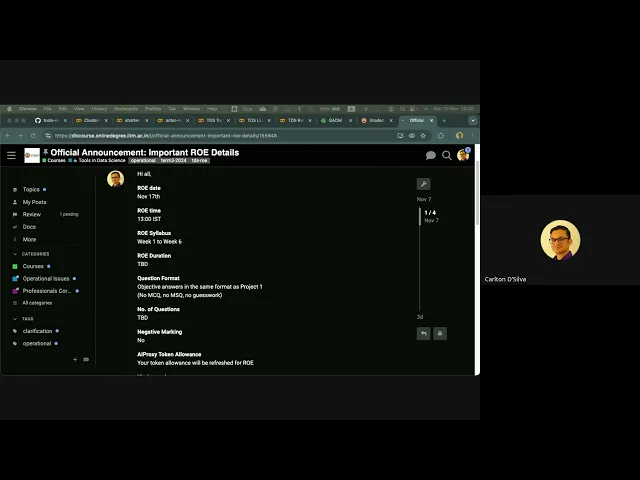
Q4: The ROE duration on the website says 1:00 PM to 1:45 PM, but Discord says “to be determined”. Is the duration not fixed? Will it increase or decrease?
A4: The ROE duration is not fixed and changes every term. I won’t know the final duration until it’s officially set closer to the date.
Q5: Is the ROE format not MCQ? The announcement said it’s the same format as Project 1.
A5: Correct, the ROE will not be in MCQ format. You’ll need to enter your answers into a text field, similar to how you would for Project 1.
Q6: Will we know if our answers are correct immediately after submission?
A6: I don’t have the exact details for this term’s ROE yet, but it’s unlikely you’ll get immediate feedback on correctness. Last term, we tried MCQs, but it was decided that this format didn’t fairly assess students’ capabilities, as it allowed for guessing. We are returning to the previous format of entering answers to ensure a fairer evaluation.
Q7: What’s the best way to prepare for the ROE?
A7: The best way to prepare is to practice using past ROEs. Set a timer, pretend it’s the real exam, and try to solve it. This will give you a very realistic feel for the experience, though without the pressure of actual marks. Remember that each term’s ROE challenges are often quite different.
Q8: Does the ROE for this term include Week 6 content?
A8: Yes, this is the first time the ROE will cover content from Weeks 1 to 6. Typically, it covers Weeks 1 to 4. This change was made because Large Language Models (LLMs) are now considered a crucial part of the TDS curriculum.
Q9: But LLM is Week 5. So, does Week 1-6 mean it includes LLM?
A9: Yes, the Weeks 1-6 coverage explicitly includes the LLM content from Week 5.
Q10: We had a session where we were shown how to approach ROEs, but not actually do one. Could we have a practice session for an ROE, maybe next class or on Thursday?
A10: We generally don’t do full ROE practice sessions in class. Our philosophy is to teach you the skills required to solve any ROE, rather than just training you for a specific one, especially since the challenges vary so much each term. However, I will talk to Jayaraj to see if we can arrange an extra session to demonstrate all the necessary skills you’ll need.
Q11: What skills are expected for the ROE? Could you provide a checklist? I heard SQL could be a possibility.
A11: The skill set is finite and covers content from Weeks 1 to 6. Yes, SQL is definitely a possibility, likely from Week 2 or 3, covering database connectivity and basic SQL. You can expect questions related to filtering, cleaning data, joining tables, and general Pandas functionalities.
Q12: When can we expect the skills session that explains what skills are needed for the ROE?
A12: The skills session will be sometime this week. We’ll send out a message with the exact timing once our schedules are confirmed. All sessions will be recorded for later viewing.
Q13: Should we practice ROEs in the session or on our own?
A13: I recommend you practice ROEs on your own. The primary challenge with ROEs is not their difficulty, but the tight time limit for a large number of questions. Speed and intuition about which tools to use, and how to use them efficiently, are key. Over-relying on tools like GPT without understanding the underlying concepts won’t help you much because the time spent prompting and debugging GPT will be too high.
Q14: Can you give a real-world example of why intuition is more important than just relying on tools?
A14: A top principal scientist at IIT Research Park shared an experience: many data science candidates know jargon but lack intuition. When asked to solve a problem, even with permission to use GPT, they struggle because they just regurgitate GPT’s answers without truly understanding or thinking independently. GPT is an excellent productivity enhancer, but it doesn’t replace human intelligence or a master craftsman’s skill. Deeply understanding your tools and how things work together is what makes you proficient, allowing you to use GPT much more effectively as an assistant.
Q15: Last term’s ROE had about 20 files that needed data extraction. How do you handle multiple files to get all data into a single file?
A15: In Python, you can use the os library to list files in a directory. Then, you’d typically use a for loop to iterate through each file, open it, read the data, and then concatenate or join all the data into a single Pandas DataFrame. It’s just a few lines of code once you know the process.
Q16: How can I quickly create dummy files or directories to practice handling multiple files?
A16: In Linux, you can use commands like touch {a..f}.txt to create multiple empty text files, or mkdir {T1..T5} to create several directories. This lets you generate test data for practice.
Q17: Any other tips for managing code during the ROE?
A17: Since the ROE is open-book, it’s smart to prepare your own notebook (like a VS Code or Jupyter notebook). In it, collect and clearly label small, clean code snippets for common tasks (e.g., loading multiple files, data cleaning operations, SQL connections). This way, you have pre-written, tested code ready to modify and use quickly without relying on GPT for basic functionalities, which saves significant time during the exam.
Q18: How many questions will there be in the ROE?
A18: The number of questions varies significantly each term. For example, last term had 8 questions, while the term before that had 20. So, it’s impossible to give an exact number, as it could be anything.
Q19: Was the End Term also MCQ last time? Will there be code-based questions in the End Term?
A19: Yes, last term’s End Term was MCQs. End Term is generally designed to be easy. While it won’t be as simplistic as last term’s MCQ format, it’s difficult to make it truly complex because we can’t test you on practical coding. The only code-based question you might see is related to CSS selectors (about an 80% chance), where you’d be given an HTML snippet and asked for the correct selector.
Q20: Is the End Term easy to score in?
A20: Yes, the End Term is typically easy to score in. Most students should be able to achieve 90% or above. It’s often a good strategy to tackle the TDS End Term first, as you usually either know the answer or you don’t, allowing you to quickly move on to other subjects.
Q21: Will GA6 be available before the ROE?
A21: It’s possible, but I cannot confirm its exact release date. You will still receive the standard 10 days to complete GA6, regardless of when it’s released. Our current priority in the backend is to validate the ROE.
Q22: What are LLM Vision Models?
A22: LLM Vision Models extend LLM capabilities to process visual data. Essentially, a video is a sequence of multiple image frames. If an LLM can analyze a single picture, it can analyze multiple pictures in sequence. This allows the model to understand and describe what’s happening in images or videos. For instance, you could send a video feed of someone working on machinery and ask the LLM to describe their actions, the tools they’re using, and other details.
Q23: How can LLM Vision Models be used for cheating detection in exams (OPP)?
A23: This is an experimental use case being trialed. The idea is to send a video feed (specifically keyframes) of students taking an OPP (online proctored exam) to a GPT system. Along with keypress data, the GPT analyzes the student’s behavior. A cheating student’s behavior patterns (e.g., head movements, gaze shifts, typing patterns) are often distinct from those of a non-cheating student. While humans might miss subtle cues, a computer can easily pick up these patterns. The LLM can be trained to recognize normal vs. abnormal behavior, allowing it to flag instances that deviate from typical, honest exam conduct.
Q24: What is Retrieval-Augmented Generation (RAG)?
A24: RAG is a powerful technique that combines the generative capabilities of LLMs with efficient information retrieval. In simple terms, if you have a vast library of documents (e.g., legal case files, medical texts, tourist reviews), sending all of them to an LLM at once is impractical due to cost, time, privacy concerns, and the LLM’s limited “context window” (the amount of information it can process at one time).
RAG addresses this by:
- Embedding/Vectorizing your data: Converting your entire library of documents into numerical vector representations (embeddings).
- Retrieval: When you ask a question, the system first uses these embeddings to quickly find the most relevant documents or snippets from your library that are semantically similar to your query.
- Augmentation: It then provides only these relevant snippets to the LLM (along with your original question) to generate a more accurate, informed, and context-specific answer.
This allows LLMs to access and utilize up-to-date, proprietary, or domain-specific information without needing to be retrained on the entire dataset.
Q25: What are the benefits of using RAG over directly sending all data to an LLM?
A25: RAG offers several significant benefits:
- Cost-effectiveness: You only send relevant snippets to the LLM, reducing API call costs.
- Efficiency: Faster processing as the LLM deals with less data.
- Privacy/Security: Sensitive proprietary data can remain local, with only relevant (and potentially anonymized) portions sent to the LLM.
- Overcoming context window limitations: LLMs have a limited “memory” for a conversation. RAG ensures they receive the most pertinent information without overflowing their context window.
- Accuracy & Freshness: LLMs can provide answers based on the most current data in your library, rather than just their pre-trained knowledge base.
Q26: How can RAG be applied in a practical scenario, like for a law firm?
A26: Imagine a law firm with a huge library of case studies, legal texts, and precedents. Using RAG, they could build an AI assistant. Instead of sending the entire library to an LLM, the assistant would convert all legal documents into embeddings locally. When a lawyer asks a question (e.g., “Find precedents related to X property dispute and Y environmental regulation”), the RAG system quickly retrieves the most semantically similar case files from the local embeddings. It then sends only those relevant snippets to the LLM, which processes them and generates a well-researched, context-aware answer or even drafts legal defenses. This drastically cuts down research time.
Q27: How can RAG help with language barriers, for example, in educational settings?
A27: Consider IIT’s new campus in Tanzania, where many students’ native language is Swahili, not English. There’s a vast amount of educational research and content in English. Using RAG, the university could convert its English library into embeddings. Then, using LLMs capable of translation (or specifically trained for it), students could ask questions in Swahili. The RAG system would retrieve relevant English content, translate it, and provide answers in Swahili. This allows students to access rich educational resources in their native language, significantly aiding their learning.
Q28: How do I get started with RAG, especially for local use?
A28:
- Choose a Model: Head to Hugging Face (huggingface.co). It’s a great resource for open-source LLMs. Look for smaller, “minified” or optimized models designed for local deployment, as larger models require substantial RAM and powerful GPUs (which regular users usually don’t have).
- Download & Install: Download a suitable model. You can use a tool like LM Studio (lmstudio.ai) which allows you to download, load, and run LLMs locally on your computer, even without an internet connection or API keys for basic usage.
- Embed your data: Convert your local data (documents, texts) into numerical embeddings using the downloaded model.
- Implement Retrieval: Set up a system (e.g., using Python) to retrieve relevant data based on semantic similarity to your queries.
- Augment & Generate: Feed the retrieved data along with your query to the local LLM to generate responses.
Q29: Are these models on Hugging Face free to use?
A29: Yes, most of the models listed on Hugging Face are open-source and free to use.
Q30: Are all models compatible with local execution? Do I need an API key?
A30: No, not all models are designed for local execution; some are too large. For public models, you typically don’t need an API key to run them locally using tools like LM Studio. However, some models (especially non-public ones or those with specific usage policies) might require authentication or API keys. You’ll need to check the documentation for each specific model.
Q31: Will there be any RAG-related questions in the ROE for this term?
A31: While RAG is an incredibly powerful and practical field, and we’re introducing you to the tools, I highly doubt there will be RAG-specific questions in this term’s ROE. However, we’re covering it because it’s a valuable skill for your future career in data science.
Q32: What’s the main difference between dot product and cosine similarity when dealing with vectors?
A32: The main difference lies in normalization.
- Dot Product: It gives a scalar value, but its magnitude depends on the length (magnitude) of the vectors. So, if vectors are larger, the dot product will be larger, even if their direction is similar. It’s not normalized.
- Cosine Similarity: It’s normalized, providing a value typically between 0 and 1 (or -1 to 1 depending on context). This means it focuses solely on the angle between the vectors, indicating how similar their direction is, regardless of their magnitude.
Q33: Why did dot product and cosine similarity give the same results for the Open AI vectors in the tutorial?
A33: Open AI’s models perform normalization on their vectors before you even receive them. Since the vectors are already normalized, calculating the dot product or cosine similarity will yield the same result because the magnitude factor (which differentiates the two) has effectively been neutralized.
Q34: What are the key skills we’re expected to learn from Week 6’s GeoSpatial Analysis with QGIS?
A34: We expect you to learn the basic functionalities of QGIS. This includes understanding what shapefiles are, common filtering techniques you can apply, and how to use QGIS for fundamental geospatial analysis. You won’t be expected to become an expert, but rather to understand its purpose and basic operations. I will briefly demonstrate how to load files and perform basic operations.
Q35: The provided link for downloading shapefile data in the GeoSpatial Analysis module doesn’t work. What should I do?
A35: You’re right, that link is outdated. Please use this link instead: https://gadm.org/. Go to the “Data” section and then “By Country” to download shapefile data. I’ve also pasted it into the chat.
Q36: Will the GeoSpatial Analysis session cover network analysis?
A36: Network analysis is an important topic, but it’s a bit too late to start looking into it now. We will not be covering network analysis in this session.
Q37: Can you remind us about the grading criteria document?
A37: Yes, I’ll remind the professor to update the grading criteria document.
Q38: How many modules do we have in TDS in total?
A38: TDS is a three-credit course. Typically, there are around nine modules in total.
Q39: How many modules will have Graded Assignments (GAs)?
A39: Not all modules will have GAs. For GAs, there will likely be around seven in total.
Q40: Will all modules have GAs? And will they be unique each time?
A40: Not all modules will have GAs. The GAs are typically unique each time, so practicing previous ones gives you an idea of the format, but the specific challenges will differ.
Q41: I encountered an issue while trying to run a model from Hugging Face locally; it asked for an “HF token”. What does that mean?
A41: An HF (Hugging Face) token is often required for certain models, especially if they are not publicly accessible or if you want to use them beyond basic functionalities. It depends on the specific model’s requirements. You’ll need to check the model’s documentation on Hugging Face. Generally, if a model is public, you won’t need a token for local execution using tools like LM Studio. If it’s not public, you’ll need to authenticate.
Q42: What is “function calling” in LLMs, and how is it useful?
A42: Function calling is an incredible capability where an LLM can understand your request and then utilize predefined tools or functions to fulfill it. For example, if you ask an LLM to “reverse the word ‘card’”, it understands “reverse” as a function and “card” as its input, and then executes that function.
The real power emerges when you chain functions. I gave it a prompt: “reverse upper ‘reward’”. It successfully understood to first apply the “upper” function to “reward” (making it “REWARD”), and then apply the “reverse” function to “REWARD” (resulting in “DRAWER”). This demonstrates the LLM’s ability to interpret and execute complex, nested instructions, effectively turning it into a powerful, code-free problem-solver. You can integrate this using API calls for practical applications.