TA’s Session TDS – 2024 11 10 19 49#
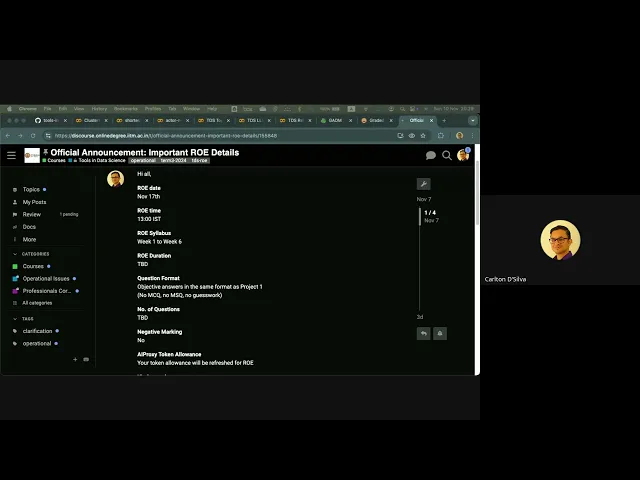
Duration: 1h 39m
Here’s an FAQ summary of the TDS live tutorial:
Q1: I just joined, could you please repeat the issue with GA5, Question 5?
A1: Some students’ answers for GA5, Question 5 won’t match the options provided. This is because OpenAI has made slight changes to the vector representations of some words/tokens in their model between when the assignment was generated and when you access it. This primarily affects a small subset of students, and you should pick the option that is closest to your calculated answer for Question 6. We’ve informed operations about this discrepancy and are waiting for their decision on how to handle it for Question 5.
Q2: My answer for GA5, Question 5 is very close to one of the options. Is that expected?
A2: Yes, that’s what’s happening. Your calculated answer might be very close but not an exact match. However, I can’t give an official answer on how it will be marked until operations provides their final decision.
Q3: The same issue occurred for GA5, Question 6. What should I do?
A3: Question 6 is indeed affected for everyone because it deals with cosine similarity and very small values, making it sensitive to even minor changes. For Question 6, you should calculate your answer and then select the option provided that is closest to your result. We have validated this approach, and it will be considered the correct answer.
Q4: The ROE duration on the website says 1:00 PM to 1:45 PM, but Discord says “to be determined.” Is the duration not fixed?
A4: Yes, the ROE duration is not fixed yet. We don’t have a confirmed time for it at the moment.
Q5: Will the ROE duration increase or decrease?
A5: I can’t say at this point. I won’t know the answer until I’m informed myself. The duration changes every term.
Q6: How should I prepare for the ROE given the changing format and duration?
A6: The best way to prepare is to practice with previous terms’ ROEs. Set a timer and attempt them as if it were the actual exam. This gives you a realistic feel for the experience. Just be aware that without marks at stake, you won’t feel the same pressure, which can affect performance. Each ROE’s challenge is different, so practicing different ones helps you develop general skills.
Q7: Will the ROE be an MCQ (Multiple Choice Question) format?
A7: No, the ROE will not be in an MCQ format. Last term’s ROE was MCQ, but we decided to revert to a format where you enter your answers in a text field, as it’s a fairer way to assess your capabilities without guessing.
Q8: For Project 1’s format, will we know immediately if our answers are correct or not?
A8: I don’t know the exact details for this term’s ROE yet, as I haven’t seen the latest version. However, based on the “Project 1 format,” you will likely have to enter your answers into a text field. It’s unclear if you’ll receive immediate feedback on correctness.
Q9: Will Week 6 material be included in the ROE?
A9: Yes, this is the first time TDS has included material from Week 1 to Week 6 in the ROE. This decision was made by Professor Anand to incorporate Large Language Models (LLMs), which are covered up to Week 5, as they are a significant part of current data science.
Q10: What’s a smart way to prepare for the ROE, beyond practicing PYQs? Can you give me a checklist of skills?
A10: While practicing past ROEs is good, focus on building fundamental skills. The ROE will cover material from Week 1 to 6. For example, you will 100% need to know database connectivity and basic SQL (covered in Week 2 or 3).
Our TA sessions this week will cover the necessary skills. We will review the course material and point out what’s relevant for the ROE. I’ll talk to Jivraj to see if we can create a dedicated session to demonstrate these skills. All these sessions will be recorded.
Q11: The last ROE had 20 files, and I’m unsure how to process many files into a single dataset. Can you elaborate?
A11: This is a common skill. You can use a Python for-loop to iterate through the files in a folder. Use the os library to get a list of file names, then open each file one by one within the loop, read its data, and append/concatenate it into a single Pandas DataFrame. This is typically just a few lines of code.
To practice, you can create dummy files and directories in your Linux terminal using commands like touch a{1..6}.txt and mkdir t{1..5}. Then, practice writing Python code to process them.
Q12: Will GA6 be released before the ROE?
A12: There will be a GA6, but I’m not sure of its exact release date. It’s possible it will be before the ROE. You will still receive the standard 10 days to complete GAs, so the ROE deadline won’t be shortened. I will put in a word to see if it can be uploaded soon for extra practice.
Q13: How many questions will be on the ROE?
A13: The number of questions varies significantly each term. There’s no fixed maximum; it could be anything. For example, last term’s ROE had 8 questions, while the term before that had 20. I cannot give you a specific number as it would likely be incorrect for your specific ROE.
Q14: Are there any code-based questions in the End Term exam?
A14: Not really. The only potential code-based question for the End Term would be related to CSS selectors. They might provide an HTML snippet and ask you to identify the correct CSS selector. If you’ve followed the CSS selector sessions, you should be able to handle it easily. There’s about an 80% chance of such a question appearing.
Q15: What’s the difference between Dot Product and Cosine Similarity?
A15: The main difference is that cosine similarity is normalized, meaning its result is always within a fixed range (0 to 1), regardless of the vector magnitudes. Dot product, however, is not normalized, so its value can be any number, and it’s influenced by the length/magnitude of the vectors.
In the context of OpenAI’s word vectors (which are used in GA5), their models already normalize the vectors before you even use them. Because of this pre-normalization, applying a dot product or cosine similarity to OpenAI’s vectors will effectively yield the same result. If you’re dealing with vectors from a different source that are not pre-normalized, then using cosine similarity is crucial for a meaningful comparison.
Q16: Can you explain Retrieval Augmented Generation (RAG) and its importance?
A16: RAG is a crucial technique to overcome the limitations of LLMs when dealing with large, specific, or private datasets. Directly feeding huge volumes of data to an LLM is costly, time-consuming, has privacy concerns, and quickly hits the LLM’s limited “context window” (how much it can remember in a conversation).
RAG works by:
- Local Knowledge Base: You maintain a local database (e.g., your law firm’s case files, a tourism organization’s reviews).
- Embeddings for Similarity: You convert your local data into numerical vector embeddings. When a user asks a question, you convert their query into an embedding as well.
- Local Retrieval: You use these embeddings to find the most “similar” or relevant pieces of information from your local database.
- Augmented Prompt: Only these most relevant snippets (a much smaller, manageable context) are then sent to the LLM as part of the prompt.
- LLM Generation: The LLM then generates a response based on this augmented, highly relevant context.
This makes the LLM’s responses more accurate, reduces costs, mitigates privacy risks, and avoids context window limitations. It’s used across many fields (e.g., medical research, customer service, education).
Q17: Can LLM Vision Models run locally on my computer?
A17: Yes, you can run LLM Vision models locally. Websites like Hugging Face (huggingface.co) offer a vast repository of open-source models for various computer vision tasks (image-to-text, text-to-image, text-to-video, object detection, etc.).
The main limitations for running these locally are your computer’s resources: the amount of RAM, the processing power of your CPU, and especially your GPU. More powerful models require more significant hardware. However, there are also “minified” or optimized versions of powerful models that are designed to run more efficiently on consumer hardware (e.g., GPT-4o is an optimized version of GPT-4). LM Studio is a software that can help you run these models locally.
Q18: What’s the purpose of the Excel Geospatial Analysis content in Week 6?
A18: The Excel Geospatial Analysis video (and associated material) is meant to demonstrate the surprising capabilities of even humble Excel for data modeling and visualization. It’s not likely to be heavily tested on the exam, as not all students have the same Excel versions or functionalities. The main value is in understanding how such visualizations can be constructed and appreciating the power of data analysis tools.
Q19: For QGIS (Geospatial Analysis software), what skills are expected for the ROE?
A19: For QGIS, you’re not expected to become an expert. The key is to understand what QGIS is for, how to perform basic operations like loading shapefiles, and basic filtering techniques. The reference link for shapefile data in the notebook is outdated; you should use gadm.org to download country-specific shapefiles. Remember to download QGIS before the session, as it’s a large software package.
Q20: What is “Function Calling” in LLMs, and why is it important?
A20: Function Calling is an incredible capability where an LLM can understand and utilize predefined functions. For example, I demonstrated how GPT can understand functions like reverse(string) and upper(string). I gave it a string and asked it to first upper then reverse the string.
The LLM was able to:
- Understand the functions I defined.
- Grasp the order of operations (function within a function).
- Execute them correctly without me writing any code.
This is a powerful feature because it allows LLMs to interact with external tools and services. You can define functions for various tasks (e.g., sending an email, querying a database, making an API call), and the LLM can decide when and how to use them based on the user’s prompt. This can be done using API calls rather than direct input.
Q21: What are the main skills expected for the upcoming ROE?
A21: While specific challenges vary, some core skill sets are almost always required:
- HTML/CSS scraping
- CSS Selectors
- Basic SQL queries and database connectivity
- Pandas data manipulation (filtering, cleaning, joining files)
- Working with multiple files (e.g., reading/concatenating many files into one DataFrame)
- Understanding and using LLM embeddings for similarity searches.
- New this term: LLM API calls, potentially using a local LLM environment like LM Studio.
We will have dedicated ROE prep sessions this week to go over these skills in detail. I’ll provide an overview of all the skills you need and point out what’s required for the upcoming ROE.
Q22: Is there a feedback mechanism for the TDS course?
A22: Yes, TDS runs an anonymous Google Form where you can provide detailed feedback on various aspects of the course: the TAs (including myself and Jivraj), the instructors (Professor Anand), and the course materials. This feedback is crucial for continuous improvement. Professor Anand is very engaged and uses this feedback to evolve the course. When the form is released, please fill it out honestly and anonymously, and encourage your peers to do so as well.