2025 10 03 week 2 - Session 4 TDS Sep 2025#
Duration: 2h 16m
Here’s an FAQ-style transcription of the live tutorial:
Q1: What exactly is a “workflow” in the context of this course, and what specific aspects should I focus on to avoid wasting time on irrelevant details?
A1: You’re right, “workflow” is a key topic. I understand that searching online can provide an overwhelming amount of information. To be efficient, you need to understand only what’s required for this course’s graded assignments (GA2, GA3, GA4, or the project). I will demonstrate the specific workflow needed today, and this session’s recording will be the official guide.
Q2: Why do some videos in the course seem optional or cover topics not directly relevant to the graded assignments?
A2: Our data shows that students often skip videos and go straight to graded assignments. Because of this, we’ve designed the graded assignments to be self-sufficient. You can tackle them directly, and if you find you need help with a concept, then you can refer to the videos or content for specific assistance.
Q3: I can’t access the recording for the Tuesday, September 30th session. When will it be available? Also, the October 1st (Wednesday) session is also not available for me.
A3: The Tuesday session will likely be uploaded to YouTube and added to the playlist. The October 1st session was Wednesday, and it should also be available on the playlist.
Q4: Can I use any Large Language Model (LLM) for generating code, or do I specifically need to use ChatGPT as shown in the workflow diagram?
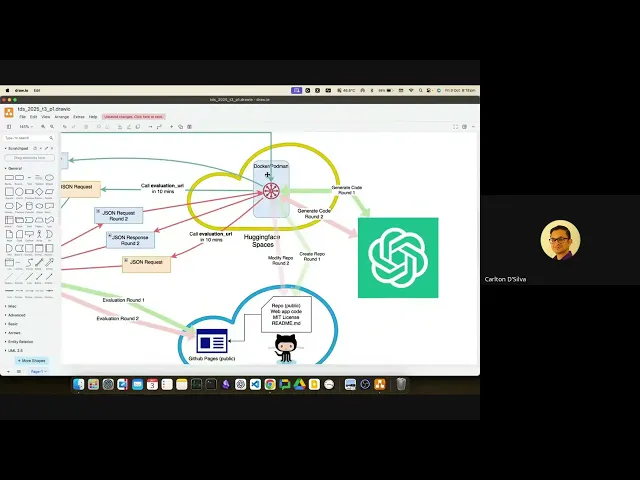
A4: The mention of ChatGPT in the diagram is just an example. You are free to use any LLM or AI tool you prefer for generating your application’s code. Similarly, the “Hugging Face Spaces” shown in the diagram is also just an example of a cloud service.
Q5: What is the purpose of the “secret” key that I need to provide, and how is it used in the workflow?
A5: The secret key is a security measure. You provide a unique secret (e.g., “92” from Shrikant). When my (the IITM) server sends a request to your application, I will include this secret. Your server will verify the secret. Since you’ve only shared this secret with us, your application can confirm that the request is legitimate and coming from IITM, preventing unauthorized access or abuse by others.
Q6: What is the significance of my API server sending a “200 OK” response immediately after receiving a request from the IITM server?
A6: The “200 OK” response is a standard HTTP status code. It’s a quick handshake that tells my server that your API server is up, reachable, and ready to process requests. It doesn’t mean the task is complete, but simply confirms initial connectivity.
Q7: My API server receives a task and needs to generate code and deploy it. What exactly needs to happen during the 10-minute timer after the initial “200 OK” response?
A7: After sending the initial “200 OK,” your API server’s 10-minute timer begins. During this time, your application must:
- Use an LLM (e.g., GPT) to generate the application code based on the task brief provided in our initial request.
- Dynamically create a new, public GitHub repository. This repo should contain the generated application code.
- Create GitHub Pages for this new repository.
- Host the generated application code on these GitHub Pages so the application is publicly accessible and runnable.
- Send a final JSON request back to our server containing all the necessary details, indicating that the task is complete. This response’s specification is outlined on the TDS project page. All these steps must be completed within the 10-minute timeframe.
Q8: Can I keep my GitHub repository private while working on the project?
A8: Yes, you can keep your GitHub repository private initially. However, you must make it public just before the final submission deadline for evaluation.
Q9: There are two “JSON request response round 2” entries in the workflow diagram. Are they the same thing?
A9: No, they serve different purposes.
- The first one is your server’s immediate “200 OK” response to our incoming Round 2 request, confirming connectivity. This is a “response” to our request.
- The second one is your server’s outgoing JSON request to us after it has completed the modification task for Round 2, notifying us of completion. This is your “request” to us. Both must occur within 10 minutes of their preceding step.
Q10: My API server receives a task (e.g., “create a snake and ladders game”). Does this mean my API needs to be able to create any type of application on the fly based on a given prompt?
A10: Yes, that’s precisely the goal and “beauty of it.” You are building an application capable of launching a web service simply by being given a prompt. Your API server will dynamically generate the code and deploy it.
Q11: How do I test if my API server is working correctly during development?
A11: We will provide you with test cases, and we’ll also show you how to create your own tests. This will be covered in detail in a future session. The script shown in the session is a lightweight way to quickly check if your API endpoints are responding, which is helpful for local development.
Q12: Is a separate backend database required for this project’s Fast API server?
A12: For this specific project, a separate backend database is likely not needed. The application you’re creating will run on GitHub Pages, which primarily hosts static websites. Any interactivity is typically handled by JavaScript directly on the client-side (frontend).
Q13: I’m concerned about the 48-hour limit for Hugging Face Spaces that was mentioned previously, and whether I can use GitHub Student Developer Pack credits for cloud services. Will these be issues for my project?
A13: We recommend using free-tier, open-source platforms suitable for everyone. We won’t suggest solutions that require privileges like the GitHub Student Developer Pack, as this course is open to all students. Therefore, you should stick to solutions that don’t incur costs or require special accounts that not everyone might have.
Q14: For deployment, should I use Hugging Face itself, or is that just one option among many?
A14: While you can deploy on various platforms like Render, Vercel, AWS, GCP, or Azure, for this project, we will be deploying on Hugging Face Spaces. You’ll need to create a Dockerfile for this. The choice of platform often depends on the specifics of your application.
Q15: What is the purpose of the .env file and the load_dotenv function in the project?
A15: The .env file is used to store sensitive information like your API keys (e.g., Google API key, Hugging Face secret key) securely. It’s a hidden file that should not be pushed to public repositories like GitHub. The load_dotenv function (from the dotenv library) loads these environment variables into your application’s memory, allowing your code to access them without hardcoding them directly. This is crucial for security and managing different configurations.
Q16: Why are we giving different secret keys in the .env file and to Hugging Face?
A16: The secret key in your .env file (e.g., “TDS is a very good course but very difficult”) is for your internal application’s use, typically for communication with the IITM server. The secret key you provide to Hugging Face is for Hugging Face itself to manage your deployment. Think of it like this: your room has a lock, and only you have the key. If someone else (like your client, Razorpay in the example) needs to access your application, they need a key that you provide to them, not the key to your room.
Q17: If I have multiple secret keys (e.g., for different APIs), how should I structure them in the .env file?
A17: You can have multiple entries in your .env file, each with a unique name (e.g., OPENAI_API_KEY, HUGGINGFACE_SECRET_KEY). When your code needs a specific key, you’ll reference it by its name (e.g., os.environ.get("OPENAI_API_KEY")).
Q18: Is it necessary to import os and dotenv for this project?
A18: Yes, you do need to import os (to access environment variables) and the load_dotenv function from the dotenv library to properly load your .env file’s variables.
Q19: What is UTF-8 in decode('utf-8')?
A19: UTF-8 is an encoding standard for characters. When you’re dealing with text data, especially from files or external sources, it often needs to be decoded from a byte stream into a human-readable string. decode('utf-8') specifies that the bytes should be interpreted using the UTF-8 encoding. This helps prevent issues with special characters.
Q20: What is the purpose of .lower() when processing user input?
A20: The .lower() method converts an entire string to lowercase. This is useful for making searches or comparisons case-insensitive. For example, if a user searches for “Apple” or “apple”, converting it to lowercase ensures both match “apple” in your database.
Q21: What is the Pydantic BaseModel used for, and why is it important for this project?
Q21: Pydantic’s BaseModel is crucial for data validation and serialization. It allows you to define the structure and expected data types of your API’s input and output.
- Validation: It automatically checks if incoming data (like from a JSON request) conforms to your defined model. If not, it returns a clear error. This reduces manual validation code.
- Serialization: It helps convert your Python objects to JSON (and vice-versa) based on your model’s structure.
- Automatic Documentation: Fast API uses your Pydantic models to automatically generate interactive API documentation (e.g., Swagger UI). In this project, Pydantic helps ensure that the data exchanged between your application and our server (and any other services like LLMs) is always in the correct format, making your API robust and easier to develop.
Q22: If I define a Pydantic model with certain fields (e.g., name, price), but the incoming data includes an extra field not in the model, what happens?
A22: If Pydantic’s BaseModel encounters extra fields not defined in your model, it will ignore them by default. It will only process and return the fields that are explicitly defined in your model.
Q23: If my Pydantic model has optional fields, or if I want to allow extra fields beyond the defined ones, how can I configure that?
A23: Pydantic offers various ways to handle this. You can make fields optional by giving them a None default value (e.g., extra_field: str = None). To explicitly allow extra fields, you can configure your model using Config or extra=Extra.allow (though this wasn’t explicitly shown in the session, it’s a Pydantic feature).
Q24: What if a required field is missing or has the wrong data type in the incoming data?
A24: If a required field is missing, or if a field has the wrong data type (e.g., sending a string when an integer is expected), Pydantic will raise a validation error, preventing the invalid data from being processed by your application. This is a key benefit for ensuring data quality.
Q25: What is a “response model” in Fast API?
Q25: A “response model” is a Pydantic BaseModel that you use to define the structure of the data your API will return in its responses. Fast API uses this model to automatically serialize your Python objects into JSON and to document your API’s output format. It ensures consistency and clarity in your API’s responses.
Q26: What is the advantage of using the Python os library for .env variables compared to a manual approach?
Q26: The os library, combined with a .env file, helps you manage sensitive information (like API keys) securely and efficiently. Instead of hardcoding keys directly into your code (which is insecure), you store them in the .env file. The os library then allows your application to access these variables at runtime. This prevents your keys from being exposed in your source code, especially when pushed to repositories like GitHub. It also makes it easy to switch configurations between development, testing, and production environments.
Q27: What is a .sh file (script.sh), and how is it used in this workflow?
Q27: A .sh file (shell script) is a text file containing a sequence of commands that can be executed by a Unix shell (like Bash). In this workflow, it’s used to automate tasks. For example, the script demonstrated automates the process of building the Docker image, running the container, and then sending multiple curl requests to your API’s endpoints to quickly test if everything is working.
Q28: So, essentially, we can create a script to automate testing of our deployed server?
Q8: Yes, exactly. You can create a script that, for example, builds your Docker image, runs your container, waits for the server to be up, and then sends various requests (like curl commands) to your API’s endpoints. This automates the testing process, saving you a lot of time compared to manually running each test.
Q29: Is this script for unit testing?
A29: No, this is not unit testing. This is a simpler method for local development to quickly check if your API endpoints are working. For production-grade unit testing, you would typically use specific Python libraries designed for that purpose, like pytest. This script helps you confirm basic functionality and connectivity efficiently.
Q30: Why are you suggesting creating and using these automated scripts for testing?
A30: These automated scripts drastically speed up your development process. Instead of manually checking each endpoint, which can take a long time, especially for complex applications, a script can do it in seconds. This allows you to quickly verify if your server is up and running, if specific endpoints are responding correctly, and if your LLM integrations are functioning as expected. It’s a way to make your work “much, much faster.”
Q31: Will the other instructors for this course also use automated testing scripts like this?
A31: No, this is my personal workflow and my suggestion to help you work faster. There’s no mandatory requirement to use this specific method in TDS.
Q32: In previous sessions, it was mentioned that Hugging Face Spaces have a 48-hour limit. Does this imply we will use GitHub Student Developer Pack credits for cloud services?
A32: No, we would not suggest using something that requires special privileges or payment. This course is open to everyone, so we prioritize free-tier, open-source solutions. We will not recommend options that require paid services or specific packs.
Q33: What is the best free-tier platform to deploy our application on?
A33: It depends on your specific application needs. Hugging Face Spaces is a good option we’ll cover. Other platforms like Render, Vercel, AWS (with their free tier), GCP (with their free tier), or Azure also offer deployment options. The “best” choice is subjective and depends on factors like your application’s size, architecture (serverless vs. traditional), and specific requirements.
Q34: If I upload my entire project, will the . in copy . . in the Dockerfile copy all files, including my .env file, exposing my secret keys?
A34: No, a .env file is a hidden file, and Docker (and Git) typically respect that. It won’t be copied or exposed. The . in COPY . . means copy everything from the current directory (where your Dockerfile is) to the working directory inside the Docker image.
Q35: How long will my deployed application stay active on Hugging Face Spaces?
A35: The TDS team manages the Hugging Face Spaces and ensures they remain active. For your project, you don’t need to worry about the 48-hour limit; the team keeps them running.
Q36: Why is .lower() used in query parameters?
A36: .lower() is used to convert the query parameter’s value to lowercase. This makes searches and comparisons case-insensitive, ensuring that “Apple,” “apple,” and “APPLE” are all treated the same when matching data.
Q37: What is the difference between a query parameter and a path parameter in Fast API?
A37:
- Path Parameters: These are parts of the URL path that identify a specific resource (e.g.,
/items/{item_id}). They are typically mandatory and used for unique identification. - Query Parameters: These are optional key-value pairs appended to the URL after a
?(e.g.,/items?search=apple). They are used for filtering, sorting, or providing additional non-identifying information.
Q38: In the GForm, you mentioned a “secret key.” If there are multiple secret keys for different services (e.g., for an AI API, another for another service), how do I handle that?
A38: You would add each secret key as a separate environment variable in your .env file. Then, in your Python code, you’d access each specific key using os.environ.get("YOUR_SECRET_KEY_NAME"), where YOUR_SECRET_KEY_NAME is the unique name you gave it in the .env file.
Q39: In the deployment section, the URL for Hugging Face Spaces is fastapi-name-random-id.hf.space. How does my application know what this specific URL is to make requests to it?
A39: When you deploy your application, Hugging Face provides a unique deployment URL. You’ll need to update your client-side code (or any other services that interact with your deployed app) with this specific URL. Your application doesn’t “know” it automatically; you configure it to use that URL after deployment.
Q40: Why is response_model=Item specified in the API route?
A40: response_model=Item (where Item is a Pydantic BaseModel) tells Fast API what structure to expect for the API’s response. It ensures that the data returned by your API conforms to the Item model, providing clear documentation for your API’s output and automatically handling serialization of the data into JSON format.
Q41: Will the other previous instructors come back for future sessions?
A41: I am new to teaching TDS, and this is my first session. I don’t have information about previous instructors or future sessions. Please ask such questions on Discord or to the course organizers.